The Aesthetic Fatigue of Cartesian Pixelation
Since the advent of early dot-matrix displays in the 1970s, pixelation has remained a foundational visual totem of digital culture. Yet on modern ultra-high-density displays, traditional pixelation—which bluntly downsamples an image into flat, sharp-edged checkerboards—frequently encounters severe aesthetic shortcomings:
- Rigid 90-degree staircase aliasing: Whether along a jawline or an organic horizon, diagonal contours are fractured into jagged right-angled steps that compromise the natural flow of the composition;
- Fragmented flat gradients: Across open skies or soft morning mist, subtle tonal shifts disintegrate into an unorganized scatter of tiny tiles, looking cluttered rather than intentional;
- Dead grid seams: Naive implementations that draw uniform black grout between cells mechanically segment the composition into a lifeless mosaic.
In generative art explorations, Taiwanese generative artist William Liang (@william77.fun) showcased an inspiring photographic translation: programmatically converting real-world photography into an organic, filleted orthogonal world. Flat skies dissolve into terraced topographical plateaus, sharp corners soften into warm circular fillets, and shimmering water surfaces crystallize into micro-chip solder pads and traces.
To capture this pioneering generative visual language inside Texture Studio, we engineered the Capsule Pixel engine—an operator running entirely within pure Canvas 2D without GPU dependencies or heavy vector geometry libraries.
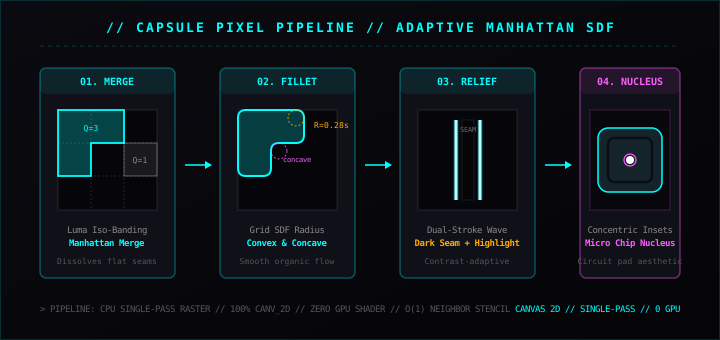
Figure 1: The four-stage Yan Capsule Pixel pipeline — from adaptive luminance iso-banding to Grid SDF corner filleting, dual-stroke waveform relief, and concentric micro-core generation.
Visual Comparison: Naive Cartesian Pixelation vs. Capsule Pixel
Before examining the underlying mathematics, observe the stark divergence in aesthetic quality on a high-contrast landscape featuring travelers on a hillside:
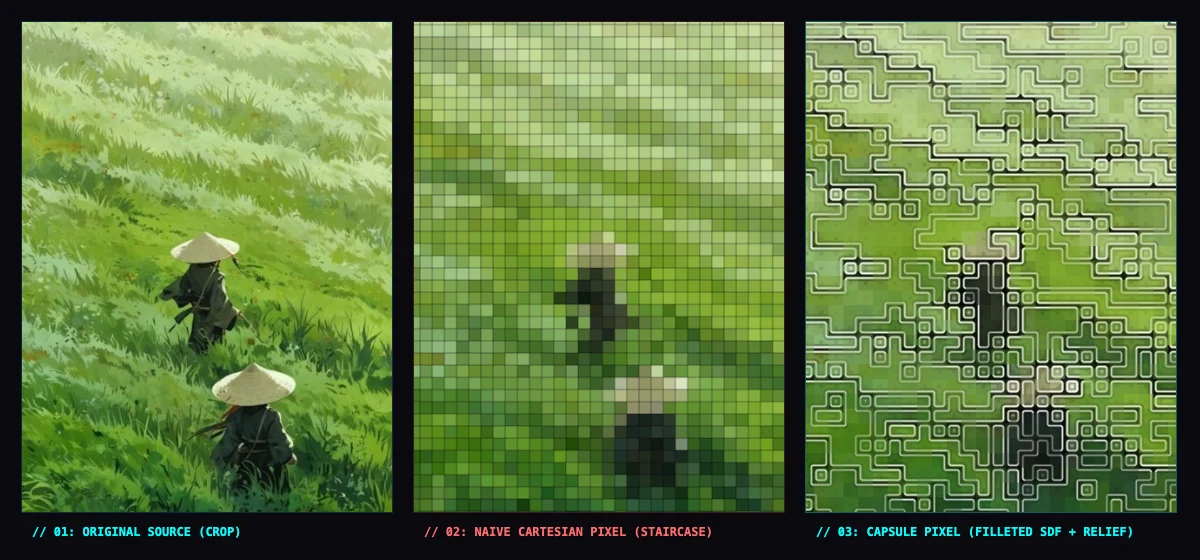
Figure 2: Visual comparison on a high-contrast crop — (01) Original source photo; (02) Naive Cartesian pixelation with harsh 90° staircase aliasing that fractures subject silhouettes and fills smooth slopes with noisy tiles; (03) Yan's Capsule Pixel engine where flat fields dissolve into filleted polyominos and silhouettes are embossed with dual-stroke relief.
Look closely at panel // 02: NAIVE CARTESIAN PIXEL (STAIRCASE):
- The conical straw hats and human silhouettes lose their edge definition: Rigid 90° steps sever the organic curve of the hats, creating a chaotic block staircase;
- The sky and grassy slope are visually fragmented: Smooth atmospheric gradients are broken into hundreds of arbitrary, flat-colored squares with mechanical black borders.
In contrast, look at panel // 03: CAPSULE PIXEL (FILLETED SDF + RELIEF):
- Smooth tonal slopes automatically dissolve internal seams, coalescing into expansive topographical terraces;
- Every right-angled corner—whether pointing outward into empty space or inward into an inlet—is smoothed by circular fillets with an exact radius of
R ≈ 0.28 · cellSize; - A crisp white highlight line sits immediately adjacent to a dark border seam, giving the entire composition an embossed, tactile relief reminiscent of etched circuit boards or architectural bas-reliefs.
Here is the complete four-stage architectural breakdown:
Stage 1: Adaptive Luma Iso-Banding & Manhattan Region Merging
The first task is eliminating redundant internal borders in smooth image zones.
We partition the canvas into a Cartesian grid of cells of size cellSize (nominally 14px, scaled dynamically by scaleFor to match overall image dimensions). Within each cell, we calculate the average RGB values and perceptual luminance:
L = 0.299R + 0.587G + 0.114B
We then quantize this luminance value into a discrete set of iso-bands Q (typically between 8 and 16 levels, modulated by the Contrast slider):
Q = round((L / 255) × Levels)
When two neighboring grid cells share the identical quantized level Q, they are topologically treated as belonging to the same continuous polyomino. Consequently, the boundary between them is erased:
// 1. Grid cell color averages and luminance quantization
const gridR = new Float32Array(gw * gh)
const gridG = new Float32Array(gw * gh)
const gridB = new Float32Array(gw * gh)
const gridQ = new Int32Array(gw * gh)

for (let gy = 0; gy < gh; gy++) {
  const y0 = gy * cellSize, y1 = Math.min(h, y0 + cellSize)
  for (let gx = 0; gx < gw; gx++) {
    const x0 = gx * cellSize, x1 = Math.min(w, x0 + cellSize)
    let rSum = 0, gSum = 0, bSum = 0, count = 0
    for (let y = y0; y < y1; y++) {
      const row = y * w * 4
      for (let x = x0; x < x1; x++) {
        const idx = row + x * 4
        rSum += data[idx] ?? 0
        gSum += data[idx + 1] ?? 0
        bSum += data[idx + 2] ?? 0
        count++
      }
    }
    const gIdx = gy * gw + gx
    const r = rSum / count, g = gSum / count, b = bSum / count
    gridR[gIdx] = r; gridG[gIdx] = g; gridB[gIdx] = b
    const lum = 0.299 * r + 0.587 * g + 0.114 * b
    gridQ[gIdx] = Math.round((lum / 255) * levels)
  }
}
This step allows expansive skies, calm lakes, and deep shadows to merge into sweeping plateaus, while preserving critical boundary steps where luminance truly shifts.
Stage 2: Grid Signed Distance Fields & Corner Filleting
Merely merging cells produces polyominos with sharp 90-degree corners. The signature visual hallmark of Capsule Pixel is filleting every right-angled corner with circular arcs.
Standard CAD pipelines perform filleting via polygon vectorization and circular arc clipping, which is computationally prohibitive for high-resolution interactive rendering. Capsule Pixel solves this through a local Grid Signed Distance Field (Grid SDF) evaluated per-pixel in O(1) constant time.
For a pixel at (x, y), let its host cell be (g_x, g_y) and its local cell coordinates be (u, v) ∈ [0, cellSize-1]^2. We inspect the quantized levels of its 8 orthogonal and diagonal neighbors: diffT, diffB, diffL, diffR, and diffTL, diffTR, diffBL, diffBR.
1. Straight-Edge Distance
If an orthogonal neighbor differs (e.g., top neighbor differs, diffT == true), the distance to that boundary is simply u.
2. Convex Corner Fillet
When two orthogonal adjacent edges are boundaries (e.g., top and left differ, diffT && diffL), in the corner quadrant (u < R and v < R), the corner must be rounded off by a circular arc of radius R = 0.28 · cellSize.
The Euclidean distance from the arc center (R, R) to the pixel is sqrt((R-u)^2 + (R-v)^2).
The signed distance to the filleted boundary is therefore:
d = R - sqrt((R - u)^2 + (R - v)^2)
3. Concave Corner Fillet
When top and left edges share the current cell's value (!diffT && !diffL), but the diagonal top-left neighbor differs (diffTL == true), an interior concave corner is formed.
The center of the rounding arc sits precisely at (0, 0), and the distance to the filleted boundary is:
d = min(d, sqrt(u^2 + v^2))
const R = cellSize * 0.28
let d = cellSize * 2 // Initialize to a large value

// Straight edge distance
if (diffT && u < d) d = u
if (diffB && (cellSize - 1 - u) < d) d = cellSize - 1 - u
if (diffL && v < d) d = v
if (diffR && (cellSize - 1 - v) < d) d = cellSize - 1 - v

// Convex filleting
if (diffT && diffL && u < R && v < R) d = R - Math.hypot(R - u, R - v)
if (diffT && diffR && u < R && (cellSize - 1 - v) < R) d = R - Math.hypot(R - u, R - (cellSize - 1 - v))
if (diffB && diffL && (cellSize - 1 - u) < R && v < R) d = R - Math.hypot(R - (cellSize - 1 - u), R - v)
if (diffB && diffR && (cellSize - 1 - u) < R && (cellSize - 1 - v) < R) d = R - Math.hypot(R - (cellSize - 1 - u), R - (cellSize - 1 - v))

// Concave filleting
if (!diffT && !diffL && diffTL) d = Math.min(d, Math.hypot(u, v))
if (!diffT && !diffR && diffTR) d = Math.min(d, Math.hypot(u, cellSize - 1 - v))
if (!diffB && !diffL && diffBL) d = Math.min(d, Math.hypot(cellSize - 1 - u, v))
if (!diffB && !diffR && diffBR) d = Math.min(d, Math.hypot(cellSize - 1 - u, cellSize - 1 - v))
This closed-form formulation produces organic, pill-shaped silhouettes without iterative root finding or polygon clipping.
Stage 3: Dual-Stroke Waveform Relief
In physical engravings or etched circuit boards, a boundary is never a flat line—it exhibits a tactile cross-sectional profile.
Capsule Pixel emulates the Mexican-hat response of the Laplacian of Gaussian (LoG) filter by stacking two complementary boundary profiles as a function of boundary distance d:
- Outer Dark Seam: Within a narrow strip immediately hugging the boundary (
d < 1.15 · kSize), the base color is darkened by up to 85%, simulating an etched groove; - Inner White Highlight Stroke: At a distance of approximately
1.3 \sim 1.8pixels inward (d ≈ strokeW), a pure white highlight line is deposited via a Gaussian bell curve; - Contrast-Adaptive Amplitude: The relief opacity scales with the Euclidean color delta
\ΔCbetween neighboring cells. Sharp transitions (a dark tower against a light sky) receive crisp black-and-white borders, while gentle internal contour terraces soften into subtle translucent grooves.
const kSize = cellSize / 14
const contrastK = Math.max(0.18, Math.min(1.0, (edgeDelta / 75.0) * contrastBoost))

// 1. Outer dark seam
const seamW = Math.max(0.75, 1.15 * kSize)
const seamAlpha = Math.max(0, Math.min(1, seamW - d)) * 0.85 * contrastK
r *= (1 - seamAlpha); g *= (1 - seamAlpha); b *= (1 - seamAlpha)

// 2. Inner white highlight stroke
const strokeW = Math.max(1.3, cellSize * 0.13)
const varStroke = Math.max(0.45, 0.75 * kSize * kSize)
const strokeAlpha = Math.exp(-Math.pow(d - strokeW, 2) / varStroke) * (0.28 + 0.68 * contrastK)
r = r * (1 - strokeAlpha) + 255 * strokeAlpha
g = g * (1 - strokeAlpha) + 255 * strokeAlpha
b = b * (1 - strokeAlpha) + 255 * strokeAlpha
Stage 4: Concentric Insets & Micro-Core Nuclei
In high-frequency areas like water ripples or foliage, grid cells cannot merge and reduce to isolated 1× 1 tiles. Rendering them as solid blocks would look visually flat.
We introduce two secondary structures to evoke integrated circuit packages:
- Secondary Concentric Inset Ring: At
d ≈ 0.28 · cellSize, an inner dark ring creates a recessed bezel inside isolated tiles; - Center Micro-Core Nucleus: At the geometric center of each cell
((cellSize-1)/2, (cellSize-1)/2), an intense Gaussian core dot is rendered. Isolated tiles receive glowing white cores, while merged regions receive faint dark pinpoints that subtly index the underlying grid lattice.
// Concentric inset ring
const ringW = Math.max(2.8, cellSize * 0.28)
const varRing = Math.max(0.55, 0.8 * kSize * kSize)
const ringAlpha = Math.exp(-Math.pow(d - ringW, 2) / varRing) * 0.35 * contrastK
r *= (1 - ringAlpha); g *= (1 - ringAlpha); b *= (1 - ringAlpha)

// Center micro-core nucleus
const distCenter = Math.hypot(u - (cellSize - 1) / 2, v - (cellSize - 1) / 2)
const isIsolated = diffT && diffB && diffL && diffR
const microWeight = isIsolated ? 0.55 : 0.22
const coreR = Math.max(1.0, 1.8 * kSize)
const microAlpha = Math.exp(-Math.pow(distCenter, 2) / (coreR * coreR)) * microWeight * contrastK
r = r * (1 - microAlpha) + (isIsolated ? 255 : 0) * microAlpha
g = g * (1 - microAlpha) + (isIsolated ? 255 : 0) * microAlpha
b = b * (1 - microAlpha) + (isIsolated ? 255 : 0) * microAlpha
Comparative Matrix: Discrete Geometric Rasterization
| Dimension | Standard Pixel Art | Voronoi Mosaic | Halftone Screen | Capsule Pixel Engine |
|---|---|---|---|---|
| Spatial Layout | Rigid Cartesian checkerboard | Irregular convex Delaunay cells | Rotated CMYK dot lattice | Adaptive orthogonal polyominos |
| Corner Geometry | Sharp 90° right-angled steps | Arbitrary polygonal vertices | Continuous circular/elliptical dots | Bi-directional SDF circular fillets (R=0.28s) |
| Tonal Handling | Local color average | Centroid flat fill | Dot area modulation | Adaptive iso-banding with seam dissolution |
| Relief Profile | None or flat 1px black stroke | Grout line between facets | None | Mexican-hat dual-stroke (dark seam + white highlight) |
| Micro-Structure | Flat solid pixel | Solid facet | Solid ink droplet | Secondary inset ring + silicon micro-core nucleus |
| Execution Cost | Interpolated downsampling (<5ms) | O(N\log N) Delaunay triangulation | Single-pass cosine raster (~20ms) | Local stencil SDF query (O(1) constant, ~38ms) |
Try It Live
Capsule Pixel is available now as kernel #31 in Texture Studio.
Drop in your own architectural shots, street photography, or portraits:
- Adjust Detail to modulate between chunky retro tiles and microscopic integrated circuit traces;
- Adjust Contrast to tighten the luminance iso-banding across gradients;
- Adjust Intensity to blend the procedural relief over your original photograph.
The browser tool runs 100% locally on your device with no server upload, zero accounts, and watermark-free PNG export up to 1400px. In the Yan mobile app for iOS and Android, this engine is optimized with precomputed lookup tables to deliver live 60fps viewfinders on your camera feed.