1-Bit 抖动在做什么
一张原始图片包含 1670 万种色彩。现在,你必须只用两种颜色来表达它:纯黑与纯白。抖动(Dithering)决定的就是每一个点的归属。
你可以直接在浏览器中使用免费的抖动转换器即时运行这些算法。
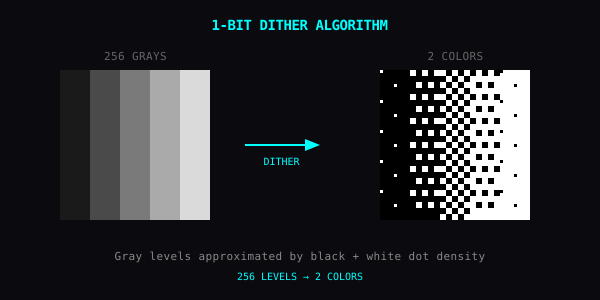
灰阶错觉源自点阵密度。密集的黑点聚集在一起,视觉感知即为暗部;稀疏的黑点散落在白底上,视觉感知即为亮部。后退一步观察屏幕——人眼的视网膜光学系统会自动完成平均化积分。
四种经典算法
每一种算法都有独特的视觉语言。建议在同一张图片上对比这四种算法:
阈值法 (Threshold)
像素高于阈值即归白,低于阈值即归黑。完全没有中间调混杂。画面硬朗、高度色调分离。最适合高对比度图形和矢量 Logo。
Floyd–Steinberg
误差扩散算法:当某个像素被强制四舍五入为黑或白时,产生的量化残差会被推至右侧和下方的邻域像素。输出效果呈现柔软、细腻的平滑过渡,是四种算法中最具摄影胶片质感的一种。
Atkinson
由 Bill Atkinson 为初代 Mac 操刀设计。与 Floyd–Steinberg 类似,但只扩散 75% 的误差,并跳过了部分邻域像素。这保留了大量未扩散的白色净空,让高光更加通透、画面对比度更加硬朗——这就是初代 Macintosh 的经典视觉印记。
Bayer 矩阵
使用预设的有序矩阵(2×2、4×4 或 8×8)逐像素比对阈值。输出带有极其规整的机械十字网纹,类似老式平版印刷的半色调网点。适合那些需要明确展现人工干预与矩阵纹理的场景。
在浏览器中即刻体验
无需安装任何软件或配置环境,你现在就可以通过我们的免费抖动转换器体验有序抖动与误差扩散。
Yan 移动端 App 提供底层的原生数值控制(Threshold、Bayer 尺寸、Pixel Scale),支持多图层实时 GPU 管线;而网页版工具则由轻量可靠的 Canvas 2D 引擎驱动,提供直接的算法到预设滤镜映射:
| 算法 | 网页滤镜 | 扩散卷积核 (Diffusion Kernel) | 视觉特征 |
|---|---|---|---|
| Bayer 有序 | Bitgrain | 8×8 Bayer 矩阵 | 规律交叉十字纹理,3–5 级色阶 |
| Floyd–Steinberg | Cobalt Grain | 标准 4 采样 (4-tap) | 纯正 1-Bit,均衡且细腻的影调过渡 |
| Atkinson | Denim Grain | 6 采样(舍弃 25% 误差) | 纯正 1-Bit,高对比度,经典 Mac 风格 |
| 自定义 3-Tap | Harbor Grain | 前向 3 采样 | 纯正 1-Bit,定向图形颗粒感 |
| 自定义 7-Tap | Meadow Grain | 双行 7 采样 | 纯正 1-Bit,柔和有机的离散质感 |
在网页版工具中,Detail(细节) 用于微调阈值与量化密度,Contrast(对比度) 在抖动前塑形亮度曲线,Intensity(强度) 控制与原图的混合比例。
App 参数调优
使用 Yan 移动端 App 时,你可以直接介入底层数学参数:
Threshold(阈值) (0–255)
黑与白的分割阈值。128 为标准中值。
- 数值调低:产生更多白像素,整体画面提亮
- 数值调高:产生更多黑像素,整体画面压暗
Bayer Size(矩阵尺寸) (2 / 4 / 8) — 仅限 Bayer
数值越小,颗粒网格越粗粝醒目;数值越大,网点越细密,几乎趋于平滑。
Pixel Scale(像素尺度) (1–8)
在抖动前先对原图做下采样。数值越大,像素块越粗,营造出厚重的复古低保真颗粒感。
适用题材
- 肖像人像:Atkinson 能带来极具 MacPaint 质感的人脸轮廓。
- 风景静物:Floyd–Steinberg 能够保全细腻的光影影调跨度。
- 字体与 Logo:阈值法(Threshold),利落干脆。
- 实体印刷感:低尺寸 Bayer 矩阵,带来强烈的机械纸墨印刷感。
调色预设配方
你可以在移动端 App 中手动微调这些参数,也可以在网页端抖动转换器中复现类似效果:
初代 Macintosh 经典
- 算法:Atkinson,阈值 128,像素尺度 2
- 视觉:1984 年 MacPaint 的纯粹粗颗粒黑白图形
报纸半色调印刷
- 算法:Bayer,尺寸 4 或 8,阈值 128
- 视觉:传统铅字排印与报纸油墨网点
孔版印刷 (Risograph)
- 算法:Floyd–Steinberg,阈值约 140
- 视觉:粗糙、略带杂质的手工独立出版物(Zine)质感
传真机 (Fax Machine)
- 算法:Threshold,像素尺度 4
- 视觉:极致脆硬、高度压缩的信号降解美学
踩坑避坑
- 需要保留微妙层次的渐变区:务必选用 Floyd–Steinberg,切忌使用断层的阈值法。
- 微小文字排版:抖动算法会与字体本身的衬线和抗锯齿打架,导致字符被杂点撕裂。
效果组合
- 抖动 + CRT:在 1-Bit 图像上叠加荧光屏扫描线,打造失落世代的计算机终端。
- 抖动 + RGB Shift:等等——RGB Shift 会重新引入色彩。若追求纯粹的 1-Bit,务必将抖动放在管线末端;若想要分色抖动的混乱美学,则先做 RGB 分离再进行抖动。
- 抖动 + 块状抖动 (Block Jitter):呈现被复印机扫描后毁损的数据切片。
核心法则
两种颜色已经绰绰有余。剩下的,全交给数学。