什麼是像素排序?
像素排序根據像素的亮度或色彩數值,對其在空間網格中的位置進行重新編排。演算法依次掃描影像的每一行(或每一列),尋找到亮度滿足門檻區間的連續像素段,並將它們按特定順序排列。最終產生的視覺張力:整張圖片彷彿正在發生數位液化與熔毀。
你可以立即在瀏覽器中使用我們免費的線上像素排序工具體驗這一演算法。
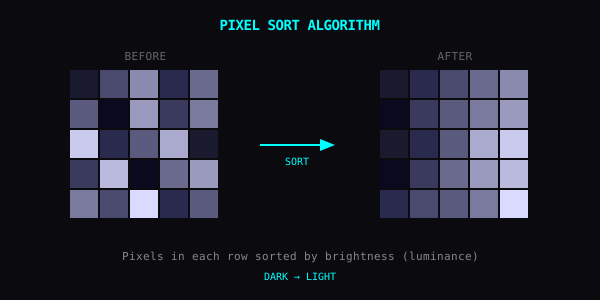
像素排序演算法的底層工作機制
核心排序算子透過三個嚴格的時序階段處理影像底層資料:
- 明度與對比度估算:每個像素根據預設的對比度曲線被換算為加權明度值,用於判定是否具有被排序的資格。
- 連續區間(Run)切分:掃描指標沿水平行或垂直列逐像素推進,切分出明度跨越門檻標準的連續像素序列。
- 原位(In-place)重排與寫回:符合條件的連續區間按「由暗到亮」完成排序,並就地寫回 Canvas 像素緩衝區。為了保留被攝物體的辨識度輪廓,排序區間通常會被硬性截斷在整行長度的 45% 以內,防止整幅攝影作品徹底瓦解為單調的線性平滑漸變。
快速上手
- 在 Yan App 中匯入圖片,或直接打開線上像素排序網頁工具
- 選定方向:在 App 中進入 Effects > Pixel Sort;在網頁版工具中,已預設預選水平(Pixel Sort)與垂直(Pixel Sort V)濾鏡供自由切換
- 選定排序方向(水平或垂直)
- 調節門檻值(在網頁端透過 Detail 滑桿調節)以控制參與排序的像素範圍
門檻值對照表
在行動端 App 中,門檻值定義了觸發重排的亮度臨界點(註:在網頁版工具中,Detail 滑桿以反向邏輯控制排序覆蓋範圍,較低的細節值對應更窄的高光條紋):
| App 門檻值範圍 | 排序生效區域 | 視覺呈現 |
|---|---|---|
| 0–30% | 僅最暗的像素參與排序 | 微妙、克制的暗部流體拉絲 |
| 30–70% | 中間調與暗部像素 | 均衡自然,契合絕大部分攝影作品 |
| 70–100% | 幾乎所有像素都被捲入 | 劇烈的數位解構與重度撕裂 |
進階技巧
圖層複合。 先進行像素排序完成結構解構,再在頂層疊加 CRT 掃描線或 RGB 色差(RGB Shift)。
善用高對比度原圖。 劇烈的明暗割裂能為演算法提供鋒利的剪切邊緣,輸出成果遠比平光照片更具戲劇感。
方向即情緒。 垂直排序呈現暴雨傾盆、油彩融化流淌的哀傷或重力感;水平排序呈現狂風掠過、光速穿梭的動態。
在瀏覽器中先行打樣。 在進入複雜的手機端多重濾鏡管線之前,先用網頁端線上像素排序工具快速摸清該畫面的最佳門檻區間。
絕佳題材推薦
- 人物肖像:髮絲化作潑墨般流淌的黑色液體。
- 城市天際線:摩天大樓的剛性幾何輪廓與暮色天空相互滲透溶解。
- 林木枝葉:樹冠的有機碎影化作飛流直下的瀑布級聯。
去破壞,去重構
把門檻值拉滿。看看會發生什麼。