What is Luma Stretch?
Luma Stretch analyzes brightness values and stretches pixels directionally. Bright areas pull, dark areas anchor (or vice versa). The effect looks like speed lines or motion trails.
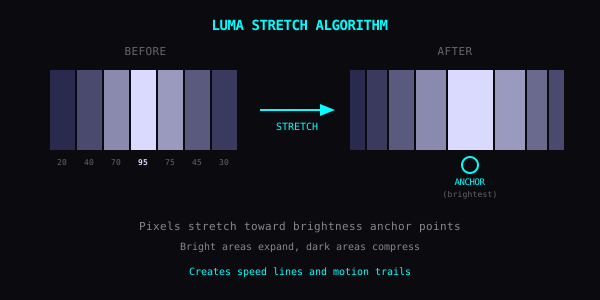
How It Works
- Scan each pixel's brightness (0-255)
- Pixels above/below threshold become anchor points
- Other pixels stretch toward those anchors
Parameters
Direction
- Horizontal: speed lines, car zooming past
- Vertical: rain, falling sensation
- Radial: explosion or zoom blur
Intensity
- 1-30%: subtle motion hint
- 30-60%: clear action feel
- 60-100%: full warp, pixels become streaks
Threshold
- Bright only: highlights stretch, ethereal glow
- Dark only: shadows stretch, noir drama
- Both: maximum distortion
Good Subjects
- Portraits: hair flows like energy
- City lights at night: neon streaks
- Sports photos: frozen motion with implied speed
Techniques
Double Pass: Horizontal first, then vertical at lower intensity. Creates a cross-hatch pattern.
Selective Stretch: Only stretch highlights. Subject looks like it's emitting light.
With RGB Shift: Add chromatic trails. Looks like faster-than-light travel.
The Point
Photos freeze time. Luma Stretch lets it leak out.