What is Pixel Sorting?
Pixel sorting rearranges pixels based on brightness or color values. The algorithm scans rows (or columns), finds pixels that meet a threshold, and reorders them. The effect: images that look like they're melting.
You can experiment with this effect immediately in your browser using our free Pixel Sorting Online generator.
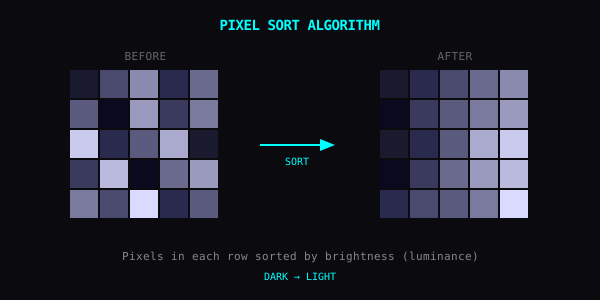
How the Pixel Sorting Algorithm Works
The core sorting operator processes image data in three sequential stages:
- Luminance and contrast evaluation: Each pixel is converted into a luminance value adjusted by your contrast curve to determine sorting eligibility.
- Contiguous run detection: The scanner walks along each row or column to find continuous stretches where luminance clears the chosen threshold.
- In-place reordering: Qualified runs are sorted dark-to-bright and written back to the Canvas buffer. Runs are typically capped at 45% of the total line length to preserve recognisable subject silhouettes rather than collapsing the entire photo into a flat gradient.
Getting Started
- Load your image in Yan or open the Pixel Sorting Online web tool
- Select your direction: in the app, go to Effects > Pixel Sort; in the browser tool, horizontal and vertical Pixel Sort are pre-selected
- Pick a direction (horizontal or vertical)
- Adjust threshold (or Detail slider on the web) to control which pixels get sorted
Thresholds
The threshold sets the trigger point in the mobile app (note: in the browser tool, the Detail slider controls sorting coverage in the inverse direction, where lower detail yields thinner highlight streaks):
| App Threshold | What sorts | Result |
|---|---|---|
| 0–30% | Only dark pixels | Subtle streaks |
| 30–70% | Mid-range and darker | Works for most images |
| 70–100% | Almost everything | Heavy distortion |
Tips
Layer effects. Pixel sort first, then add CRT scanlines or RGB shift.
Use high contrast images. Strong light/dark separation creates more dramatic results.
Direction matters. Vertical feels like rain or dripping. Horizontal feels like wind or speed.
Preview in the browser. Test threshold ranges in Pixel Sorting Online before applying complex multi-filter chains.
Good Subjects
- Portraits: hair turns liquid
- Cityscapes: buildings bleed into sky
- Trees and foliage: cascade effect
Go Break Something
Crank the threshold. See what happens.