> 結論から
RGB Shift pulls a photo apart into its red, green and blue channels and offsets each one separately, producing the broken-TV or anaglyph-3D look. Classic offset sends red left and blue right; vertical split offsets up and down for a scanline feel; radial shift spreads channels outward from the centre for something more organic. It suits portraits, text and logos, and works as an alternative to motion blur because it implies movement without softening the image.
How RGB Shift Works
Digital images have three color channels: Red, Green, Blue. RGB Shift pulls them apart and offsets each one separately. You get that "broken TV" or old 3D glasses look.
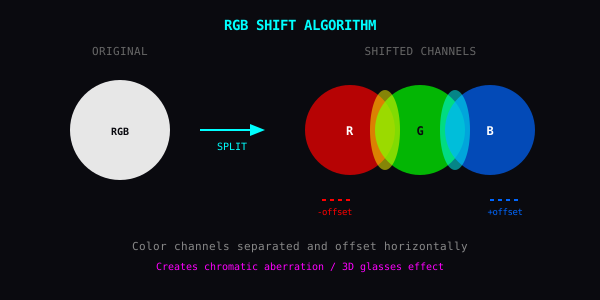
Techniques
Classic Offset: Red goes left, blue goes right. Instant retro.
Vertical Split: Offset channels up/down instead. Gives a scan-line glitch feel.
Radial Shift: Channels spread outward from center. More organic, less mechanical.
Where It Works
Portraits: Makes faces unsettling. Good for album covers.
Text and Logos: Instant cyberpunk.
Instead of Motion Blur: RGB shift suggests movement without the usual blur softness.
Combinations
- RGB Shift + Pixel Sort = digital watercolor. Test pixel sorting in your browser via Pixel Sorting Online or experiment with raw textures in Texture Studio.
- RGB Shift + Block Jitter = corrupted broadcast
- RGB Shift + Luma Stretch = hyperspeed trails
Why It's Interesting
Separating color channels shows how digital images are constructed. Three layers stacked perfectly, until they're not.
> よくある質問
- What is the RGB shift effect?
- A digital image stores three colour channels stacked perfectly on top of each other. RGB Shift offsets them from one another, so edges gain coloured fringes. It is the same visual language as anaglyph 3D glasses or a misaligned television signal.
- How do I get the retro 3D glasses look?
- Use the classic offset: red displaced to the left, blue to the right, green left in place. Keep the offset small; the effect reads as chromatic aberration at low amounts and as an obvious duplicate image at high ones.
- Can RGB shift replace motion blur?
- Often, yes. Motion blur implies speed by destroying detail, while channel separation implies it while every edge stays sharp. That makes RGB Shift the better choice when the subject still needs to be legible.